Posts

SAP CO (Controlling) Introduction

Introduction The SAP CO (Controlling) Module provides supporting information to Management for the purpose of planning, reporting, as well as monitoring the operations of their business. Management decision-making can be achieved with the level of information provided by this module.  Some of the components of the CO(Controlling) Module are as follows:  · Cost Element Accounting · Cost Center Accounting · Internal Orders · Activity-Based Costing ( ABC) · Product Cost Controlling · Profitability Analysis · Profit Center Accounting The Cost Element Accounting component provides information which includes the costs and revenue for an organization. These postings are automatically updated from FI (Financial Accounting) to CO (Controlling). The cost elements are the basis for cost accounting and enable the User the ability to display costs for each of the accounts that have been assigned to the cost element. Examples of accounts that can be assigned are Cost C...


ASAP Methodology/ 6 Phases of Implementation

6 phases of Implementation SAP 1)       Presales In this phase, SAP and other ERP’s try to sell their products to the clients (i.e. companies). And then company chooses which is more suitable for their requirements (let’s say they chose SAP, then our work starts.) 2)       Preparation        Landscape information/ preparation (server info. Cost, how many people going to use it etc.) ·          Team size: two teams implementation team and core team ·          (Project managers and steering committee from implementation team and core team together called PMO: Project Management Organization) ·          As is study: study of current situation, processes, legacy system etc. This is done by core team. ·          As is flow chart (tools a...

Depreciation methods

Here is a example of the depreciation methods and different methods: Suppose a piece have acquisition and production value of $1000, life value is 10 years and scrap value is $2000  Straight line method without basis reduction:  Cost/life --> $10000/10--> $1000 Straight line method with basis reduction:  (cost-scrap value)/life = $800 Diminishing balance method:  %=1/life= 10% For 1st year its $1000 and net book value is $9000 For 2nd year its 10% of NBV of first year that is $900 and net book value for second year is $9000-$900= $8100 Accumulated depreciation for first year is $1000, for second year is $1900 etc. 

Asset master record AS01

Assets are created under a folder called asset class. Asset class are nothing but classification of assets. Asset classes are buildings, vehicles, intangible assets, assets under constructions etc. We assign number ranges, screen layouts and account determination, default values to the asset class. Account determination contains acquisition cost account, depreciation expense account, accumulated depreciation account, gain/loss account, revaluation account etc.

Asset Accounting

Image
In SAP FICO, Asset Accounting (FI-AA), is used for managing and supervising fixed assets. It works as a subsidiary ledger to the FI General Ledger. Asset Accounting is intended for international use, thats why there is no country specific rules in SAP system. Asset Accounting is highly integrated with other modules and it can post directly to other modules. Asset life cycle:

iDoc types and applicable message types

Outbound processing: BENREP     BENEFIT1 CARNOT    DELVRY01 CREADV     PEXR2001, PEXR2002 DEBADV     PEXR2001, PEXR2002 DELFOR     DELFOR01 DELINS     DELFOR01 (FDS and JIT) DELJIT     DELFOR01 DESADV     DELVRY01, DELVRY02, DELVRY03 (previously: DESADV01) EXPINV     EXPINV01, EXPINV02, EXPINV03 GSVERF     GSVERF01 IFTMIN     SHPMNT03 IMPINV     IMPINV01 INVOIC     INVOIC01 ORDCHG     ORDERS01, ORDERS02, ORDERS03, ORDERS04, ORDERS05 ORDERS     ORDERS01, ORDERS02, ORDERS03, ORDERS04, ORDERS05 ORDRSP     ORDERS01, ORDERS02, ORDERS03, ORDERS04, ORDERS05 PAYEXT     PEXR2001, PEXR2002 PRICAT   ...

iDoc transactions in SAP

The following transactions  can be used in iDoc transactions. WE02: iDoc list report ( It can be used to display and edit iDocs.) WE19: Test tool for iDoc processing (mock up) WE20: Partner Profile WE21: Ports in iDoc processing ( It identifies an external port that controls the iDoc flow to an external system, For example, RFC, File, ABAP-PI etc. WE41: Outbound process code WE42: Inbound process code BD87: Inbound processing BD88: Outbound processing

SAP iDocs EDI

The iDoc is an example of Electronic Data Interchange (EDI).  EDI is also called paperless exchange. EDI (Electronic Document interchange) - EDI is the electronic exchange of business documents between the computer systems of business partners, using a standard format over a communication network. EDI can be of two types: Outbound and Inbound. Advantages of EDI idocs:  Reduced Data entry errors Reduced processing time Availability of data in electronic form Reduced paperwork Reduced Cost Reduced inventories and better planning Standard means of communications Better business process IDOC: IDOC is a container that can be used to exchange data between any two processes. 1. One Control Record. 2. One or many Data Record 3. One or many Status record.  IDocs are defined and considered on two levels, the technical and the business level. The former allows them to support application-independent functions, e.g. routing and handling ...

Currency in SAP FICO

Image
There are mostly three type of currencies in SAP FICO Company code currency :  Parallel Currency  Group currency If the account currency is same as the company code currency, then you can post to that GL account in any transactional currency. But if Account code currency is different from the company code currency, SAP system thinks that, the GL account is foreign currency GL account and hence should  be able to be posted only in that foreign currency of that GL account and not in any other currency including its own company code currency.  For example if a company code currency is USD and GL account currency is also USD then we can post in any transaction currency. But if company code currency is in USD and GL account currency is in EUR then we can post to that GL only in EUR not in any other currency, not even in USD. 

Dunning

Dunning is an important field in customer/ vendor master record in SAP FICO system. It reminds customers to pay bills on time. It has 4 levels and at each level system send message to customer. In dunning, it is very important to assign dunning parameters to master data. That's how system gets to know how to dun a customer. We can put a dun block too in the master data. Dunning can be used to check secure customers in credit management. 

General Ledger, GL, G/L Interview/ Certification questions

I can create G/L at  Charts of Account but not at Company Code - True I can create G/L account in the required Company Code without creating in Charts of Account. -False I can create Vendor account in purchasing Organization without creating in general data.- False (Must have to create first in General data) I have to create G/L in Charts of account and then have to create in all company code.- False If a vendor account is not created in Company code level, it can not be used for posting. -True

SAP FICO Account Payable Introduction

from Ketan Patel Courtesy:http://www.slideshare.net/eddai

Void issued checks FCH9/ reprint checks FCH7

In case of voiding an issued check for some reason we can do it through FCH9. It does void check but payment is not going to get reverse. We have to reprint the check via FCH7. It allows to void and reprint the check. 

Void an unused check

Image
Checks can be printed wrong, ripped during printing etc. So it need to get void.  in SAP FICO system, we can void check through, FCH3. Give the check number you want to void (must be unused) and the void reason. Now when you want to assign new check it will not allow you to assign the same check number. 

Payment through checks/ manual check FCH5

In FBL1n, if we can see we can not find any check information. What if we want to pay via check ? We have to pass it as cash and then assign it to a check. For example, we want to assign a check for a line item paid in FBL1n. We want to assign a check for payment document. FCH5 is the answer. Enter payment document number, company code, house bank in FCH5 screen. It will also ask for check number. Here we need to the next check number available. SAP FICO System will automatically pull adrress and other data. Go ahead and save it. 

Check Lots FCHI

Image
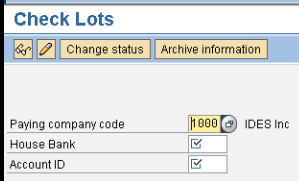
FCHI is the t code to create check lots for given house banks in SAP FICO system. Here we give company codes, house bank  (its the bank through which we want to pay) and account ID (for bank) Here we can set up check lots their to and from check numbers ranges.

Automatic clearing F.13

Image
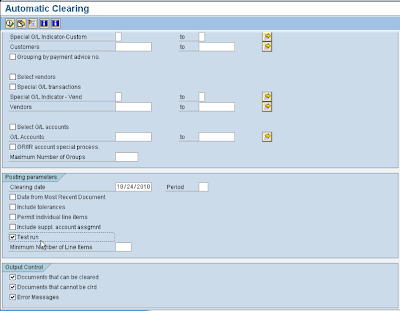
In SAP FICO system, we have many vendors. It is not possible to check for each and every vendors and check for invoice due to clearing . So SAP system provides automatic clearing in which if system found certain criteria match then it will go ahead and clear line items automatically. Menu path is: Financial accounting --> A/P A/R --> business transactions --> open item clearing --> automatic clearing Here we set up criteria by account type, charts of accounts, by account ranges etc. F.13 gives proposal of line items to get clear automatically. If you are ok with the proposal then it will clear all the line items.

Down payment F-48

Image
In SAP FICO system, we select special G/L indicator. It will select different G/L account for special G/L. To display dows payment line item, we go in the same T code FBL1n and select special G/L indicator. Here we can see down payment line item with A. While clearing, select special G/L indicator A to display it.

Clearing

Line items need to get cleared once it gets posted. For example, if we pay to any vendor through F-53 in SAP FICO system, it stays uncleared. In SAP we can clear it via three ways. Manual clearing Clearing with posting  Automatic clearing 

Incoming Payment F-28

In SAP system, Incoming screen is almost same as outgoing payment. Here we gives bank account through which we receive payment, Customer number and customer account D. All other concepts are similar as  Outgoing payment.