Posts

General Ledger, GL, G/L Interview/ Certification questions

I can create G/L at  Charts of Account but not at Company Code - True I can create G/L account in the required Company Code without creating in Charts of Account. -False I can create Vendor account in purchasing Organization without creating in general data.- False (Must have to create first in General data) I have to create G/L in Charts of account and then have to create in all company code.- False If a vendor account is not created in Company code level, it can not be used for posting. -True

SAP FICO Account Payable Introduction

from Ketan Patel Courtesy:http://www.slideshare.net/eddai

Void issued checks FCH9/ reprint checks FCH7

In case of voiding an issued check for some reason we can do it through FCH9. It does void check but payment is not going to get reverse. We have to reprint the check via FCH7. It allows to void and reprint the check. 

Void an unused check

Image
Checks can be printed wrong, ripped during printing etc. So it need to get void.  in SAP FICO system, we can void check through, FCH3. Give the check number you want to void (must be unused) and the void reason. Now when you want to assign new check it will not allow you to assign the same check number. 

Payment through checks/ manual check FCH5

In FBL1n, if we can see we can not find any check information. What if we want to pay via check ? We have to pass it as cash and then assign it to a check. For example, we want to assign a check for a line item paid in FBL1n. We want to assign a check for payment document. FCH5 is the answer. Enter payment document number, company code, house bank in FCH5 screen. It will also ask for check number. Here we need to the next check number available. SAP FICO System will automatically pull adrress and other data. Go ahead and save it. 

Check Lots FCHI

Image
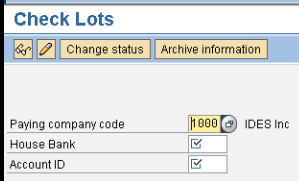
FCHI is the t code to create check lots for given house banks in SAP FICO system. Here we give company codes, house bank  (its the bank through which we want to pay) and account ID (for bank) Here we can set up check lots their to and from check numbers ranges.

Automatic clearing F.13

Image
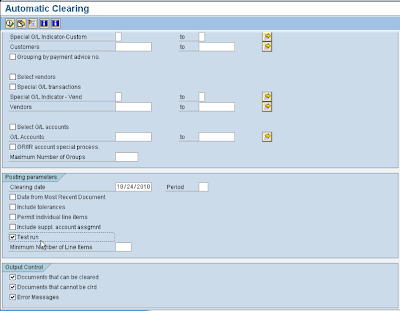
In SAP FICO system, we have many vendors. It is not possible to check for each and every vendors and check for invoice due to clearing . So SAP system provides automatic clearing in which if system found certain criteria match then it will go ahead and clear line items automatically. Menu path is: Financial accounting --> A/P A/R --> business transactions --> open item clearing --> automatic clearing Here we set up criteria by account type, charts of accounts, by account ranges etc. F.13 gives proposal of line items to get clear automatically. If you are ok with the proposal then it will clear all the line items.