SAP FICO/SD/FSCM material, training, interview questions for beginners and expert professionals
Post with Reference, FBR2
Get link
Facebook
X
Pinterest
Email
Other Apps
Suppose we posted a document and now we post one more document resembles like the earlier document we posted with same date same account except some values changed.
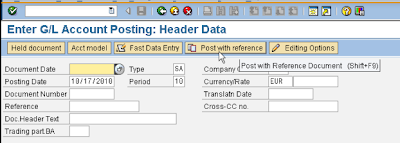
To post a new document in reference with an old document click post with reference in FB02 --> it will be directed to FBR2 automatically.
Batch in put session is the same for all the modules and processes. Its independent and it can be use for all the processes. In SM35, we can select the session for recurring entry or for any other scheduled process. We can manage sessions, lock it, unlock it, see logs etc. For running batch input session it gives us 3 options. Foreground, background and errors only. Foreground means system will roll all the transaction on the screen and we can see it. Background means system will process all the transaction in background. Errors only means the system will process in background but will show errors. For ease we select extended log and expert mode while starting a batch input session. Now once we run batch input session we need to know results of it right? Here it is how we get results of batch input session in SAP FICO. Batch job overview
In SAP FICO, F-53 kept the line items open even if it got paid. How to clear them? Through F-44. Here give the vendor account number whom we want to clear line items. Process open items will redirect to the new screen. Select which line items to be cleared, simulate and save. It will clear the line items and gives a document number. Upon displaying document it shows a document with no line items but just header data. It is an important certification question that only clearing document display have just header data and no line items. All the financial accounting entries saved in tables BKPF and BSEG for header data and line item data respectively. So for most of the documents there is a link between these two tables, but for clearing document there is an entry in BKPF only.
Partial payment to a vendor posted through the same transaction code. Suppose we want to pay $1500 for $2500 line item. Select partial payment tab and then click on payment amount tab in particular line item. As we can see in the vendor line item display, SAP system will keep both the line items for $2500 and $1500. But $1500 line item as plus and $2500 line item as minus. It affect the balance as the payment done but it did not cleared anything. Partial payment does not clear the line item, it will keep both line items open. So there are not any clearing document but it maintain invoice reference document for what invoice payment done. There is one more way of payment and that is Residual payment Also go through The difference between partial and residual payment. Now as the SA system kept the line items open how to clear them? in SAP FICO, we clear vendor open line items through F-44 Now suppose we want to ma...
Comments
Post a Comment